Indianapolis, Indiana

Willock Bench

Tube Amplifier & Instrument Repair

Real bench work. Real diagnostics. Every repair documented and warrantied. Tube amps, guitar electronics, synthesizers, pedals, and professional audio equipment. Based in Indianapolis — drop off by appointment at my shop or Jonas Productions.

What I Work On

🔥

Tube Amplifiers

Retube, bias, recap, hum diagnosis, tone issues, and full troubleshooting. Fender, Marshall, Vox, Mesa, and all major brands.

🎸

Guitar & Bass Electronics

Pickups, rewires, jack replacement, pot cleaning, full setups, intonation. If it has strings and electronics I can fix it.

🎛️

Synthesizers & Keyboards

Vintage and modern synthesizer repair, key contact cleaning, component replacement, and general troubleshooting.

🎚️

Pedals & Effects

Troubleshooting, jack and switch replacement, component repair, and modifications. All brands and formats.

🔊

Professional Audio

As a working backline technician at Jonas Productions I service professional audio equipment across all major brands.

📋

Documented Repairs

Every repair is logged with diagnosis, fix, and parts used. You get a clear picture of what was done and why.

Service Rates

All repairs begin with a $45 bench fee — applied to your repair total if you proceed.

🔥 Tube Amplifiers

Retube + bias — combo$65 + parts
Retube + bias — head$85 + parts
Bias only (your tubes)$45
Power supply recap$95–150 + parts
Speaker replacement$45 + parts
Troubleshooting & repair$65/hr + parts

🎸 Guitar & Bass

Full setup + intonation$55
Pickup replacement$45 + parts
Full rewire$65 + parts
Output jack replacement$35 + parts
Pot / switch cleaning$35
Electronics troubleshooting$65/hr + parts

🎛️ Synths & Pedals

Synth troubleshooting$65/hr + parts
Key contact cleaning$45
Pedal troubleshooting$55/hr + parts
Jack / switch replacement$30 + parts
ModificationsQuoted per job

📋 Policies

Bench / diagnostic fee$45
Minimum charge$45
Parts markupCost + 25%
Standard turnaround3–7 days
Rush service (48hr)+ $35
Labor warranty30 days

Repair Log

Selected repairs documented from intake to completion.

Ampeg SVT Classic — Screen Resistor Failure & Full Retube

2026-03-30 • Fixed

amp ampeg svt tube bias screen-resistor 6550 high-voltage

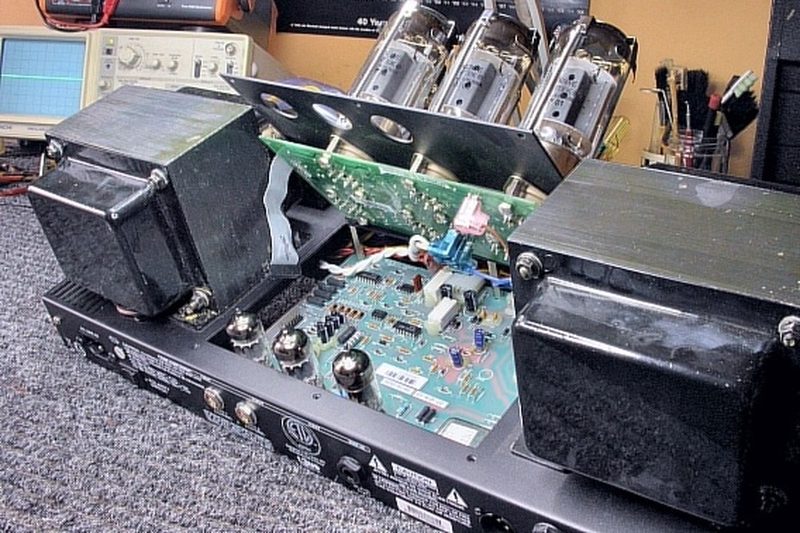
Device: Ampeg SVT Classic Bass Head

Symptom: Screen resistor failures — likely triggered by a shorted or failing output tube. Burnt smell, possible loss of output. Some resistors visually burned or cracked, others stressed but not yet failed.
Diagnosis: Visual inspection confirmed burned and out-of-spec screen resistors on the main PCB near the output tube sockets. The SVT Classic runs six 6550 output tubes at B+ voltages in excess of 500V DC — screen resistor failure is one of the most common service issues on this platform. Best practice is to replace the full set rather than individual failed units, as surviving resistors under the same stress will fail shortly after. Sockets and associated PCB traces inspected for heat damage and corrosion.

Fix: Replaced all 12 screen resistors with 470Ω 5W wirewound units (one per tube position), ensuring physical clearance from the board surface for heat dissipation. Installed a matched set of six Sovtek 6550WXT+ output tubes. Powered up slowly, allowed a 15-minute warm-up, then set bias using a bias probe at each tube socket. Target: 28–32mA per tube idle current. Confirmed all six tubes within a few milliamps of each other given the matched set. Re-verified bias after 10 minutes under load — stable throughout. Reconnected an 8Ω speaker cab, applied input signal, confirmed clean output across full range with no hum, noise, or oscillation.

Always replace screen resistors as a full set — the ones that haven't failed yet are already stressed. The SVT Classic is hard on output tubes. Keeping bias conservatively set and using quality matched tubes extends service intervals significantly. If screen resistor failures are recurring, check for underlying issues: marginal B+ voltage, loose sockets, or early tube failure. Recommend retube and rebias every 1,000–2,000 hours of heavy use. Documented final bias readings per tube position for service history.

Avalon U5 — Total Positive Rail Failure (Transformer Winding Open)

2026-03-30 • Fixed

preamp di avalon power-supply transformer rails diagnostics

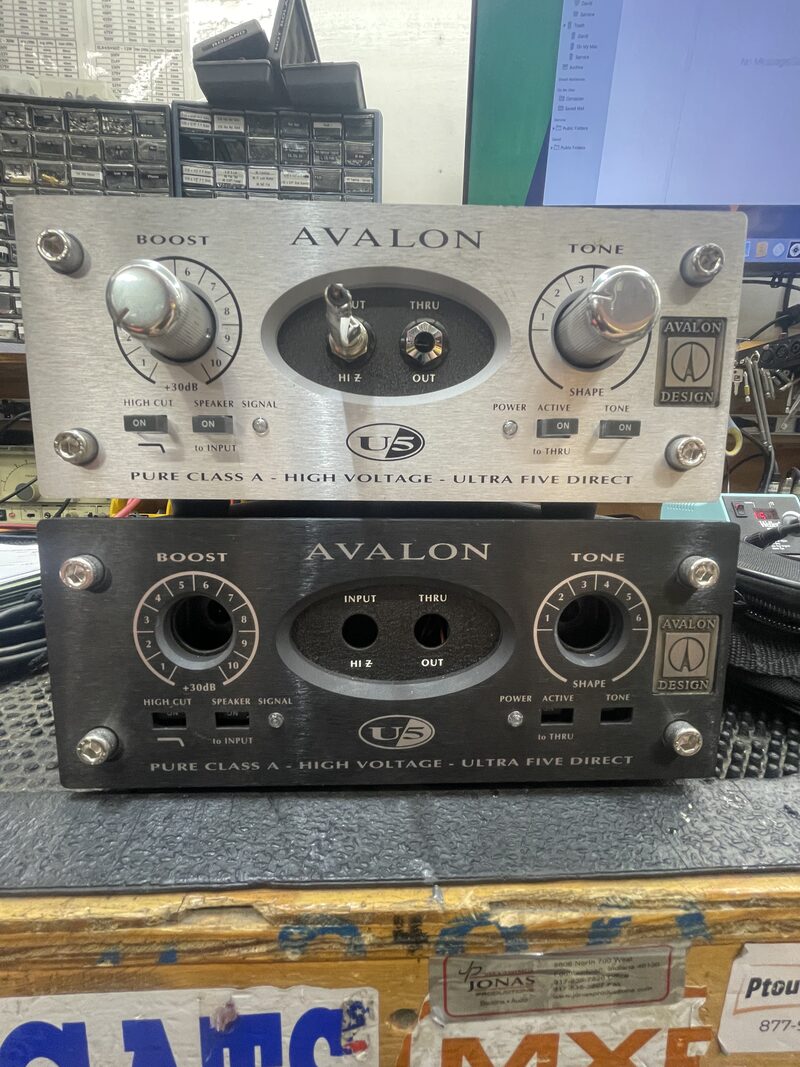
Device: Avalon Design U5 Pure Class A DI / Preamp — PCB ASSY 5600-9520

Symptom: Unit presented with suspected power supply fault. No audio. Voltage measurements on intake confirmed severely abnormal supply rails — positive side completely dead, negative side partially degraded.
Diagnosis: Filter cap survey taken first. C1 at expected −54V (negative rail alive). C2 at only −27V — exactly half expected, indicating half-wave rectification on that leg. C3 and C4, which should hold the +54V raw positive rail, reading essentially zero. Positive supply completely dead.
All four rectifier diodes (D1–D4) tested in-circuit — all showed 0.5V forward, OL reverse. Diodes were good. Replaced as a precaution regardless, powered back up — no change. C3 and C4 still zero. Fault definitively upstream of the rectifier.
Q3 (positive regulator control transistor) measured at all three pins — base, collector, and emitter all sitting in negative territory. Not a faulty transistor — no positive supply to power it. ZD1 (6.2V positive reference zener) initially appeared suspect at 0.74V in-circuit, but recognized as a correct diode-check behavior — a standard DMM can't trigger a 6.2V zener into avalanche. ZD1 cleared. All anomalous downstream readings were symptoms of the missing positive raw rail, not independent faults.
AC measurements moved to the T5 toroidal transformer secondary terminals directly — bypassing connectors and PCB pads. Confirmed: one secondary winding of the T5 open circuit. No AC output on the positive winding. Single root cause for all observed symptoms.

Fix: Removed and replaced the Avalon T5 toroidal transformer with correct replacement unit. Reconnected all secondary wiring with polarity confirmed on all winding taps. Solder joints at all wire termination pads inspected and reflowed.
Post-repair verification: all four filter caps restored to correct voltages (±54V raw rails). All six regulated rails confirmed within spec — +32V, +15V, +6.2V, −32V, −15V, −6.2V. Q3 bias voltages normalized. ZD1 reference measuring +6.2V correctly. Unit returned to service.

Toroidal transformer winding failures are silent — no burn smell, no visible damage, nothing wrong visually. The transformer looked completely normal while delivering no output on one winding. Only AC measurement at the transformer terminals themselves will confirm or clear the transformer.
Key lesson: follow the AC before chasing the DC. In any power supply fault, confirm AC is present at the rectifier inputs before replacing DC-side components. The four new rectifier diodes were unnecessary — had the transformer been measured first, it would have been identified sooner.
Every anomalous reading in this unit — wrong Q3 voltages, ZD1 confusion, collapsed regulated rails — was a downstream symptom of one dead transformer winding. No regulator components needed replacement.

Fender Twin Reverb — No Reverb (Dead Recovery Tube)

2026-03-30 • Fixed

amp fender twin-reverb reverb tube 12ax7 signal-path

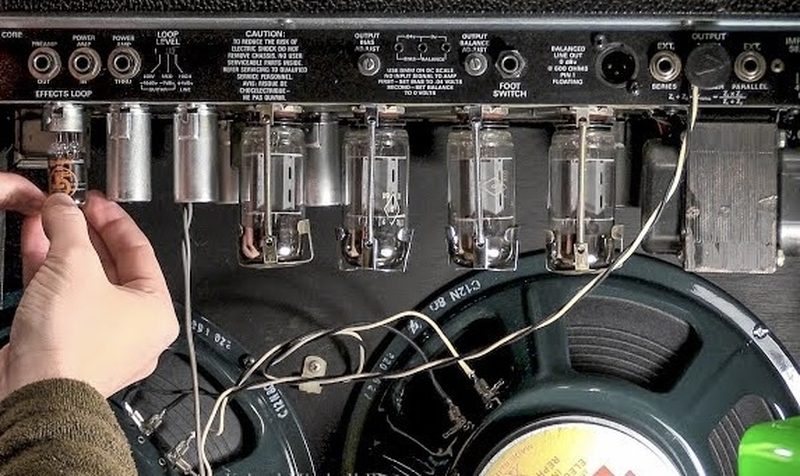
Device: Fender Twin Reverb Guitar Amplifier

Symptom: Reverb completely absent. Not weak — fully gone. Reverb knob from 1 to 10 produced no change in the dry signal whatsoever. Amplifier otherwise sounded normal: loud, clean, full output.
Diagnosis: First suspect was the reverb tank — easiest and most common failure point. Opened the tank and found a broken wire on the transducer inside. Resoldered the wire carefully. Reinstalled tank, reconnected RCA cables. No change — reverb still absent.
Swapped the RCA cables and cleaned the jacks. No change.
With the tank and cables ruled out, fault moved inside the amp. The Twin Reverb reverb circuit uses two 12AX7 tubes — one to drive signal into the tank, one to recover the signal returning from the tank. If the recovery tube fails, the tank can be working perfectly and nothing comes back. Swapped the reverb recovery 12AX7 with a known good tube.

Fix: Replaced the reverb recovery 12AX7 tube. Reverb restored immediately — full splash and decay returned on power-up. Amp verified at multiple reverb settings. Original broken wire inside the tank was left resoldered as found; the tank itself was not the cause of the fault.

Classic example of a repair that took an extra step. The broken wire in the tank was a real find and looked convincing as a root cause — but the actual fault was the recovery tube downstream. The tank fix was real work that needed doing anyway, but the tube was the reason there was no reverb. Follow the signal path all the way through before closing a fault.

Leslie Speaker — Motor Service (Dry Bearings & Glazed Drive Wheel)

2026-03-30 • Fixed

leslie speaker motor mechanical lubrication service

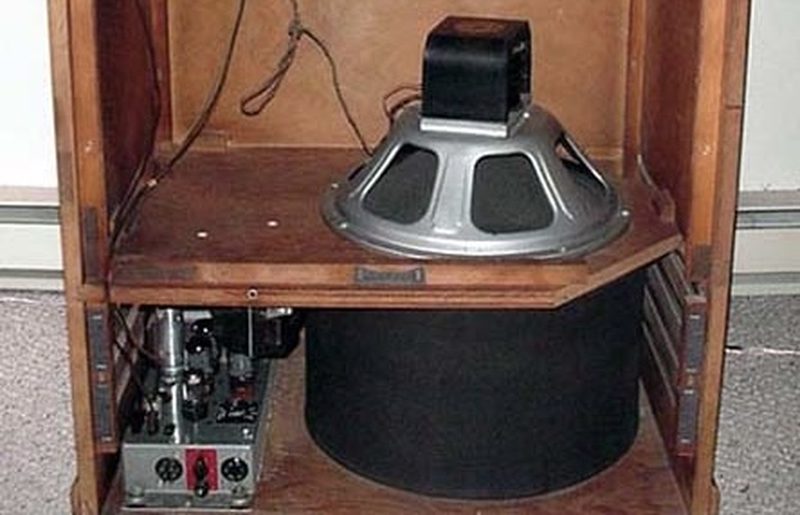
Device: Leslie Rotary Speaker Cabinet

Symptom: Scraping, chirping, or rattling noise from the cabinet during operation, especially at slow rotor speed. Noise worsened over time. Rotor spin sounded rough when turned by hand with power off.
Diagnosis: Removed back panel and inspected the rotor assembly. Smell of warm dust and old burnt oil. Spun the wooden rotor by hand and reproduced the noise — confirmed mechanical, not electrical. Two faults identified: dry motor bearings (old oil had broken down, sticky and dark) and a glazed rubber drive wheel that was slipping on the rotor pulley instead of gripping it.

Fix: Disconnected and removed the drive motor from its mounts, labeling all wiring before disconnecting. Placed motor on the bench.
Cleaning: opened the oil ports, removed old degraded oil from shaft, wicks, and housing. Cleaned rubber drive disk, shaft, and housing with cotton swabs and cloth. Inspected all surfaces.
Oiling: added fresh light machine oil to bearings and felt wicks. Allowed oil to soak in. Spun shaft by hand — noticeably smoother and quieter before reassembly.
Rubber drive wheel: surface was glazed and hard — slipping rather than gripping. Lightly sanded with fine sandpaper to remove the glaze and restore a matte, grippy surface. No material removed beyond the glazed layer.
Reinstalled motor, reattached belt, aligned rubber wheel to pulley, tightened all mounts. Powered on and tested at both slow and fast rotor speeds. No noise. Smooth Leslie swirl at both speeds.

Leslie motors are simple machines that last decades — but they need oil. The rubber drive wheel glazing is a common failure mode on older units and very easy to overlook visually. A glazed wheel looks fine but slips under load, causing the rotor to hunt or the motor to labor. Light sanding is all it takes. Do not use solvents on the rubber — they cause it to harden further and crack.

Minimoog Model D — Oscillator Tuning & Calibration

2026-03-30 • Fixed

synth moog minimoog oscillator tuning calibration analog

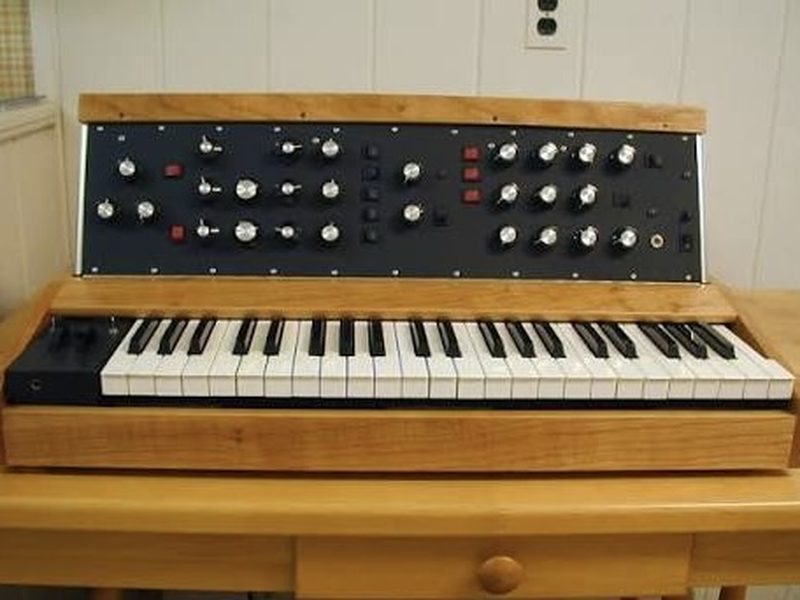
Device: Moog Minimoog Model D Synthesizer

Symptom: Oscillators drifting off pitch during play. Notes sliding flat shortly after power-on. Tuning unstable — chords sour, oscillators not tracking each other correctly across the keyboard range.
Diagnosis: Classic cold-start drift. The Model D's analog oscillator circuitry — transistors, resistors, capacitors, and especially the Moog Ladder Filter — all have temperature-dependent characteristics. When the unit is cold, these components operate slightly outside their nominal values and drift as temperature rises. The synth must reach stable thermal equilibrium before tuning can hold. In this case the unit had not been given adequate warmup time and was being tuned and played cold. Additionally, the oscillator trimpots (RANGE and SCALE for each oscillator) required iterative adjustment to bring all three oscillators into correct tracking across the keyboard.

Fix: Performed full warmup — 20 minutes powered on, no playing, no direct heat sources near the unit, room temperature confirmed within the 50–95°F operating spec.
Global Reset performed: held F0, G0, A0, B0 (four lowest white keys) during power-on to restore factory baseline.
Setup for tuning: TUNE knob centered, all three oscillators at 4' Sawtooth, OSC 1 volume on, all others off, Modulation Wheel down, Pitch Wheel centered, Glide and Decay off.
Engaged the built-in A-440 reference tone. Tuned OSC 1 RANGE trimpot against the highest A key until beating between oscillator and reference dissolved to a clean unison. Tuned OSC 1 SCALE trimpot against the lowest A key. Iterated between high and low A — RANGE and SCALE interact — until both ends of the keyboard tracked correctly.
Brought OSC 2 up in the mixer, tuned against OSC 1. Then OSC 3 against OSC 1. All three oscillators confirmed tracking to a single unified pitch across the full keyboard range. A-440 reference switched off. Synth left to play — stable.

The warmup period is not optional on the Model D. Tuning a cold Model D is wasted time — the oscillators will drift the moment temperature changes. Always allow the full 20 minutes before beginning the trimpot procedure.
The RANGE and SCALE trimpots interact with each other — expect multiple passes between the high A and low A. This is normal and expected per the service procedure. The A-440 built-in reference is the most reliable calibration source for this procedure.
Only a qualified technician should adjust the internal trimpots. Do not place the unit near radiators, amplifiers, or direct sunlight during operation.

Rhodes Electric Piano — Full Tuning & Pickup Setup

2026-03-30 • Fixed

rhodes piano tuning pickup voicing electric-piano setup

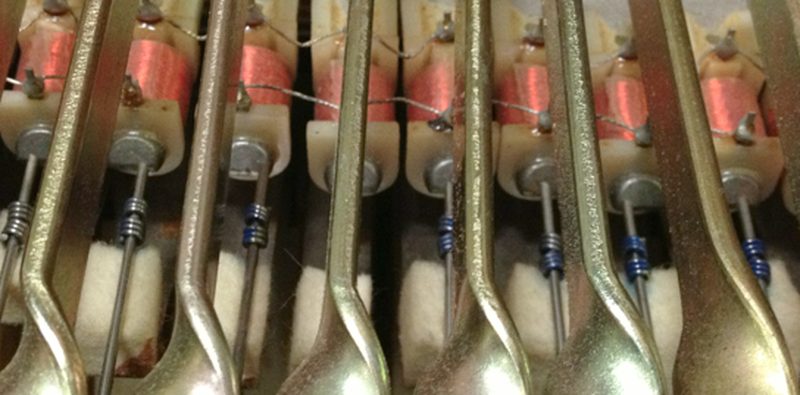
Device: Rhodes Electric Piano (Stage)

Symptom: Multiple notes out of tune across the keyboard. Some notes flat, some sharp, some with slow wobbling beat frequency against adjacent keys. Uneven output volume across registers. Tone lacking characteristic Rhodes bark on hard keystrikes.
Diagnosis: Opened the lid and exposed the full tine/tone bar/pickup array. Checked all 88 notes against a tuner while playing single notes. Identified specific flat and sharp notes and notes with beat oscillation indicating tine-tone bar misalignment. Pickup heights visually inconsistent across registers — some pickups sitting too far from their tines (weak, thin output), others not set for optimal voicing.

Fix: Tuning: adjusted tine springs note by note. Moving a spring toward the tip raises pitch — moving it toward the base lowers pitch. Adjustments are small — a millimeter makes a meaningful difference. Iterated on each out-of-tune note until the tuner stabilized and beat frequencies resolved. Worked through all 88 notes.
Pickup voicing: adjusted pickup height on all notes needing correction. Pressed each key, observed tine vibration arc, and moved the pickup closer incrementally — checking at both soft and hard velocity. Target: clean bell tone at soft velocity, characteristic bark and growl beginning at medium-hard velocity, tine clearing the pickup face at maximum strike without mechanical contact. Verified no tine-to-pickup contact at full strike velocity on any note.
Final check: played full chords across all registers — tuning even, volume balanced, tone consistent from bass to treble. Hard keystrikes producing the characteristic Rhodes bite throughout.

Rhodes setup is iterative — tuning affects voicing and pickup positioning can subtly affect perceived pitch at high velocities. Plan for a full session, not a quick adjustment. Work systematically from bass to treble.
The spring position is the only tuning adjustment — nothing to turn, nothing to strike. Very small movements have significant effect. If a tine is severely out of tune, check whether the tine itself is bent or the tone bar has shifted before chasing it with the spring alone.
Pickup distance is where the tone lives. Too far and the Rhodes sounds like a toy. The right distance is where soft = warm bell, hard = bark. Every Rhodes is slightly different — trust your ears over any fixed measurement.

Korg Triton — Factory Reset & Sound Reload

2026-03-30 • Fixed

synth korg triton workstation factory-reset firmware floppy

Device: Korg Triton Music Workstation

Symptom: Unit needed full factory reset. Sounds corrupted or missing. Required return to factory default state with all original programs, combinations, and samples restored.

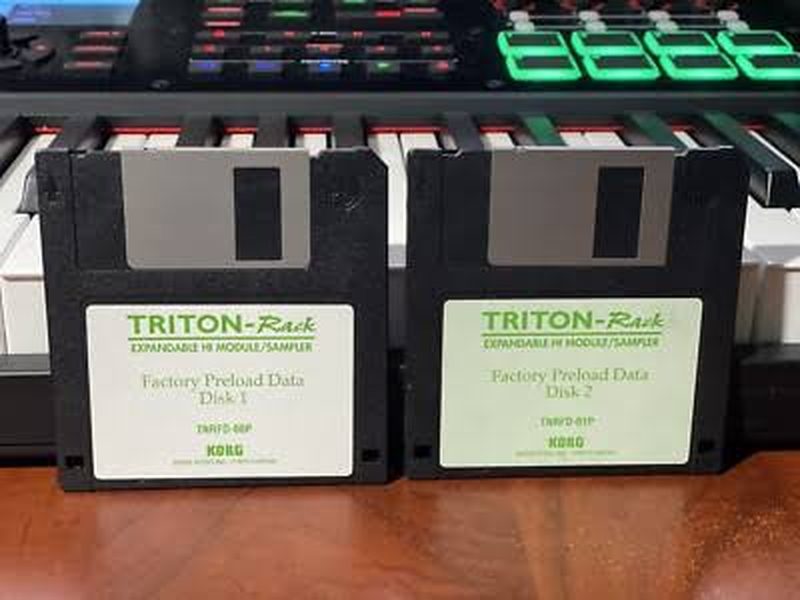
Diagnosis: The Triton factory reset is a two-part procedure that catches a lot of people out. Step one initializes memory — which wipes all sounds and leaves the unit with a single default program. Step two reloads the original factory sounds from the PRELOAD.PCG file. If the floppy drive isn't operational or the preload disk isn't ready before step one is performed, the unit ends up stuck with one default sound and no way to reload. Verified floppy drive operation first before proceeding.

Fix: Step 1 — Memory initialization: held ENTER + 0 simultaneously during power-on. Unit initialized and booted with all sounds replaced by single default program. Expected behavior.
Step 2 — Factory sound reload: inserted preload floppy disk containing PRELOAD.PCG into the floppy drive. Pressed DISK to enter Disk mode. Pressed Load tab. Set Drive Select to FDD. Selected PRELOAD.PCG file. Selected Load Selected from the page menu. Confirmed load dialog and specified PCG contents. Factory programs, combinations, and drum kits loaded successfully.
Verified all factory banks populated correctly. Spot-checked programs across A, B, C, and D banks. Confirmed original factory sounds present and playable throughout.

The Korg factory preload files are available as a free download from korg.com — you do not need the original disks that came with the unit. A cheap USB floppy drive works fine for writing the files to 3.5" disk. Keep the preload disk stored somewhere obvious (taped inside the lid is a common practice) so it's always available for the next reset.
Do not perform the memory initialization until the floppy drive is confirmed operational. If you initialize without a working drive and preload disk ready, you will be stuck with a single default sound.
For Triton Studio owners: the original preload data is also backed up on the internal hard drive — the floppy is only needed if that data is missing or the drive has failed.

Submit a Repair Inquiry

Fill this out and I'll get back to you within 24 hours to confirm dropoff.